7/10/2012

Types of DVD Players and Recorders


DVD players and recorders offer sharp pictures and clear sound. They support DTS surround and Dolby digital audio embedded in movies. Most DVD players can play types of media, like CD, VCD, etc and some even come with a VCR.

DVD Recorders / VCR Combos

Many new recorders have a VCR bundled with them. These comb devices enable you to watch DVD and also old VHS tapes.

Single-disc Players

This type of DVD players can play only one DVD at a time.

DVD Player / VCR Combo

Players and VCR combos can DVDs, CDs, and VHS tapes.

Multi-disc Players

These players allow 2-6 DVDs playback continuously.

Mega-Changer Players

Use mega-changer players to store, categorize, sort and play numbers of discs.

Light Portable DVD Players

These kinds of players are perfect for people on the move. People can play DVDs on the car, a train or airplane.

Progressive-scan Players

Progressive-scan players can deliver the most crisp and vivid pictures. They support high resolution signals with progressive scan. You can get a progressive-scan DVD player featuring “2:3 pull down” and “3:2 inverse pull down” to obtain improved picture quality.

Region-free DVD Player

One can play any DVD from any region in the world with a region-free DVD player. Some support both NTSC and PAL video format.

DVD Recorders

Using DVD recorder, you can not only play DVDs, but also can record TV programs that you like and watch them later or repeatedly. Some recorders even include a digital video recorder.

7/04/2012

Convert DVD Movies to an iPod on Windows


Many people would ask these questions:
* How do I put DVD movies on my iPod?
* What video format does an iPod support?
* How to rip DVDs to my iPod?
An iPod supports MP4 video with 320*240 resolution. You can’t directly put DVD movies on an iPod because an iPod neither has a DVD drive on nor supports MPEG-2 format. This article will show you how to put DVD on iPod using Aviosoft DVD to iPod Converter, a professional tool for iPod video.
The Goal
Take whatever DVD source you want to use and rip it to MP4 (320*240) video that is supported by an iPod.
how to put dvd to ipod
1. Load DVD movie
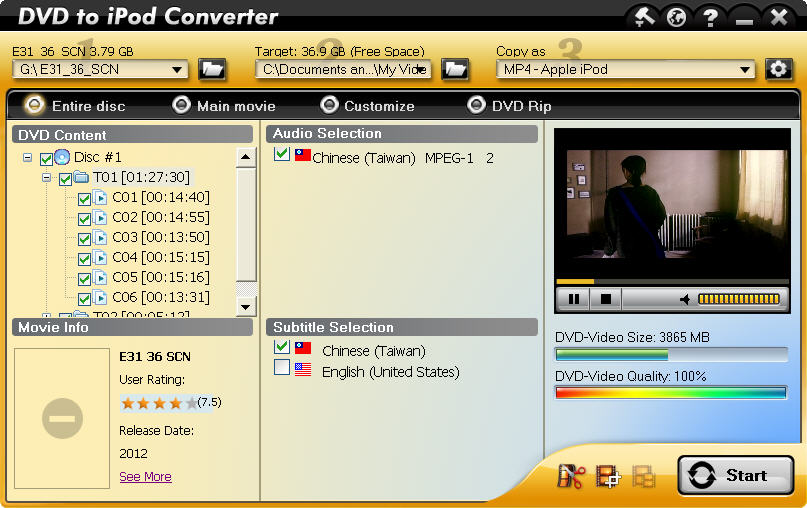
Download DVD to iPod Converter, install and run it on Windows. Insert the disc into the DVD drive. The converter will auto load the disc, and display all the information including video size, video quality, audio, subtitle, titles, etc.
2. Convert DVD to iPod
2.1. Set output format.
Click setting to choose a resolution. Here, we choose “High Quality (320×240)”. You can also customize the video.
2.2. Choose a conversion mode.
There are 4 conversion modes available, select your desired one.
2.3. Start conversion.
Start DVD to iPod conversion by clicking the “Start” button on the right bottom corner.
Tips: If you just want to rip a chapter, just choose the “Customize” mode and uncheck other titles.
3. Put DVD on iPod
After the conversion finishes, you will get a file that is ready to be played on iPod. But do you know how to put DVD on iPod? Here is the way:
3.1. Click open after the conversion finishes.
3.2. Find the file in the destination folder and transfer it to iTunes.
Finally, you can enjoy the DVD movie on your iPod freely. If you want to learn more, please visit: DVD to iPod Converter.

6/27/2012

How to Copy DVD to iPhone with Only Main Title?


There are several ways to copy and convert DVD movies. One of them is to copy DVD to an iPhone with only the main movie title. It is wise to choose copy DVD to a file with only main movie. It will bring plenty of benefits, in terms of time and space, for example. Copying a single title (main title) take less time than converting all titles.  And you can also save time by only watching the main movie content instead of the whole. Accordingly, Main Movie Copy will occupy less space of your computer.
Main Movie mode in DVD to iPhone Converter automatically removes all unwanted intros, menus, languages, and more. And iPhone is a perfect mobile terminal to watch videos for its high resolution and flexible control.

How to Copy DVD Main Movie to iPhone

In order to copy DVD to iPhone, you need to prepare DVD to iPhone converter software. You can try Aviosoft DVD to iPhone Converter. It is able to remove all copy protections, decrypt and convert DVD movie with main title only to iPhone.
After your download, install and run it on a Windows computer, you can start the DVD main movie to iPhone conversion.

Step 1. Load DVD

Insert your DVD into DVD drive.

Step 2. Output Settings

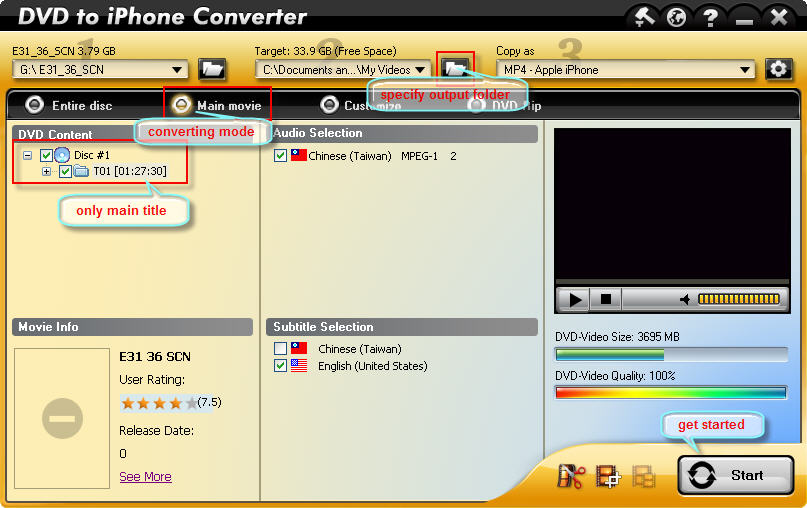
Find converting mode on the top of interface, choose Main movie. Specify an output folder to save the converted file. Choose audio & subtitle.

Step 3. Start Converting

Click “Start” button to get the converting process started.
dvd main movie to iphone